
Page 1 of 50
Module 2 overview
This module explains how to turn a problem into an algorithm, express its logic in pseudocode, and communicate the same steps with a flowchart.
By the end, you should be able to:
- Identify the inputs, outputs, assumptions, and steps of an algorithm.
- Write pseudocode using sequence, selection, and repetition.
- Read and draw flowcharts using the appropriate symbols.
- Trace worked examples and check boundary cases before writing code.
Notation used here: SET assigns a value; = inside a condition compares values; MOD gives a remainder. Pseudocode FOR i = 1 TO n includes both endpoints. Python uses different syntax and excludes the stop value of range().
Key idea. An algorithm describes the solution. Pseudocode and flowcharts are two ways of representing that solution.
Page 2 of 50
Start, stop, and flow lines
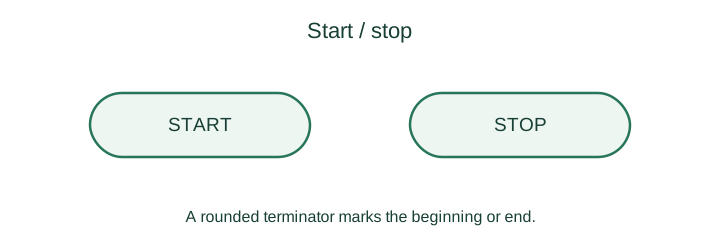
A terminator is an oval or rounded rectangle containing START or STOP. A simple algorithm has one entry point and a clearly marked end.
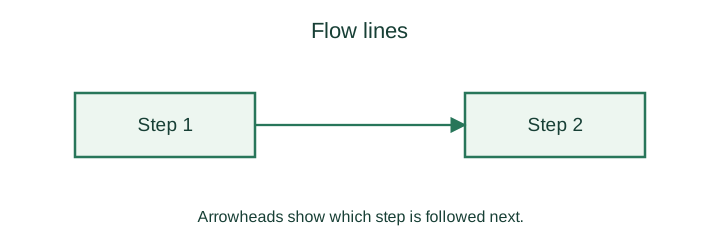
A flow line is a line with an arrowhead. Follow its direction to determine the next instruction. Draw the main flow from top to bottom or left to right; avoid crossing lines when possible.
Page 3 of 50
Processing and input/output symbols
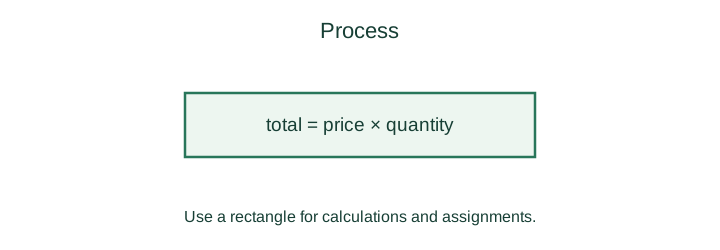
A process rectangle contains a calculation or an assignment, such as total = price × quantity. Write the operation inside the symbol.
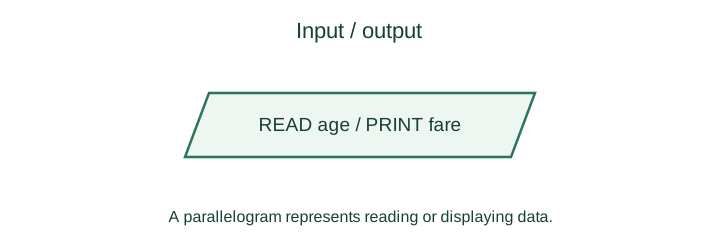
An input/output parallelogram represents reading data or displaying a result. State which values are read or printed. Initializing a variable is a process, rather than an input operation.
Page 4 of 50
Decisions and continuation connectors
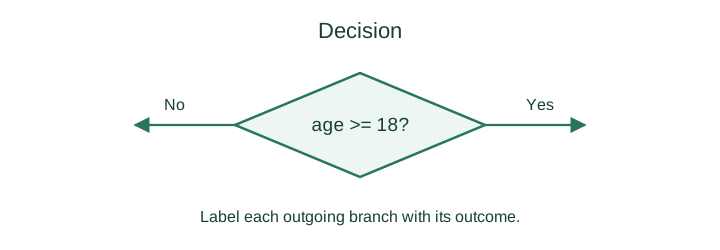
A decision diamond contains a condition. For a Boolean condition, draw two outgoing branches labelled Yes/No or True/False. Each branch must lead to the appropriate next step.
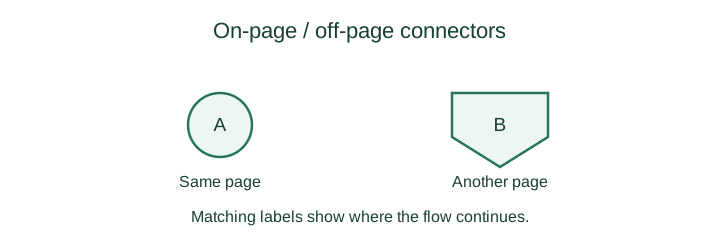
An on-page connector is a labelled circle that continues the flow elsewhere on the same page. An off-page connector is commonly a pentagon pointing downwards and refers to another page. Use matching labels so the reader can find the continuation.
Page 5 of 50
Module calls and counter-loop notation
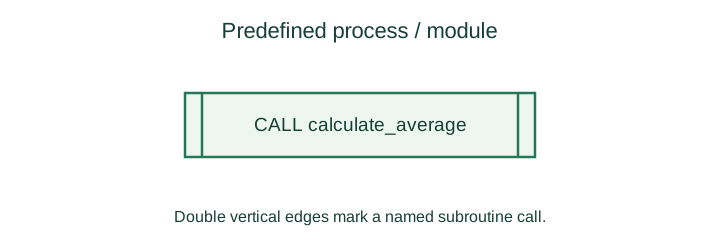
A predefined process is a rectangle with two vertical lines near its sides. It calls a named function or module whose steps are defined elsewhere. Show the call here and explain the called procedure separately.
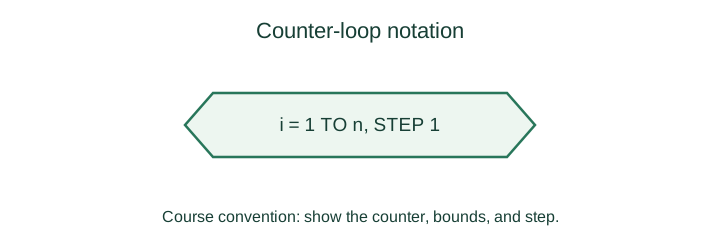
The course uses a hexagon for counter-loop notation. Include the counter, starting value, ending value, and step. In other conventions, the same shape represents preparation or initialization, so state the convention you use.
A complete loop still needs a condition, a body, and an update. The worked flowcharts below show these explicitly with process and decision symbols.
Page 6 of 50
Calculate simple interest
START
READ principal, rate, years
SET interest = principal * rate * years / 100
PRINT interest
STOP
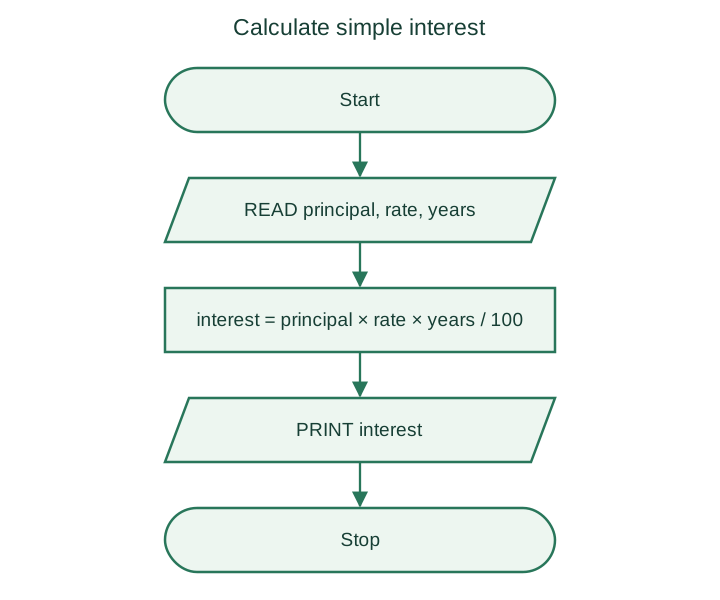
Inputs: principal, annual rate as a percentage, and time in years. Check: principal 1000, rate 5, and time 2 gives interest 100. This is simple interest, not compound interest.
Page 7 of 50
Find the larger of two numbers
START
READ a, b
IF a >= b THEN
    SET largest = a
ELSE
    SET largest = b
END IF
PRINT largest
STOP
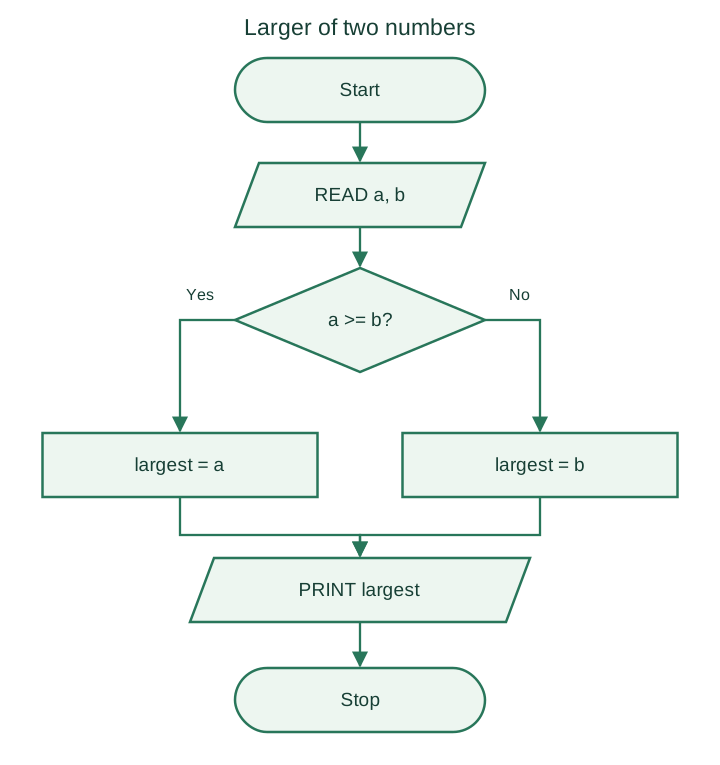
If the inputs are equal, either value is the maximum. For (4, 9) the result is 9; for (7, 7) the result is 7.
Page 8 of 50
Flowchart example: find the smallest of three numbers
SMALLEST
1. START
2. READ a, b, c
3. SET smallest = a
4. IF b < smallest THEN
       SET smallest = b
   END IF
5. IF c < smallest THEN
       SET smallest = c
   END IF
6. PRINT smallest
7. STOP
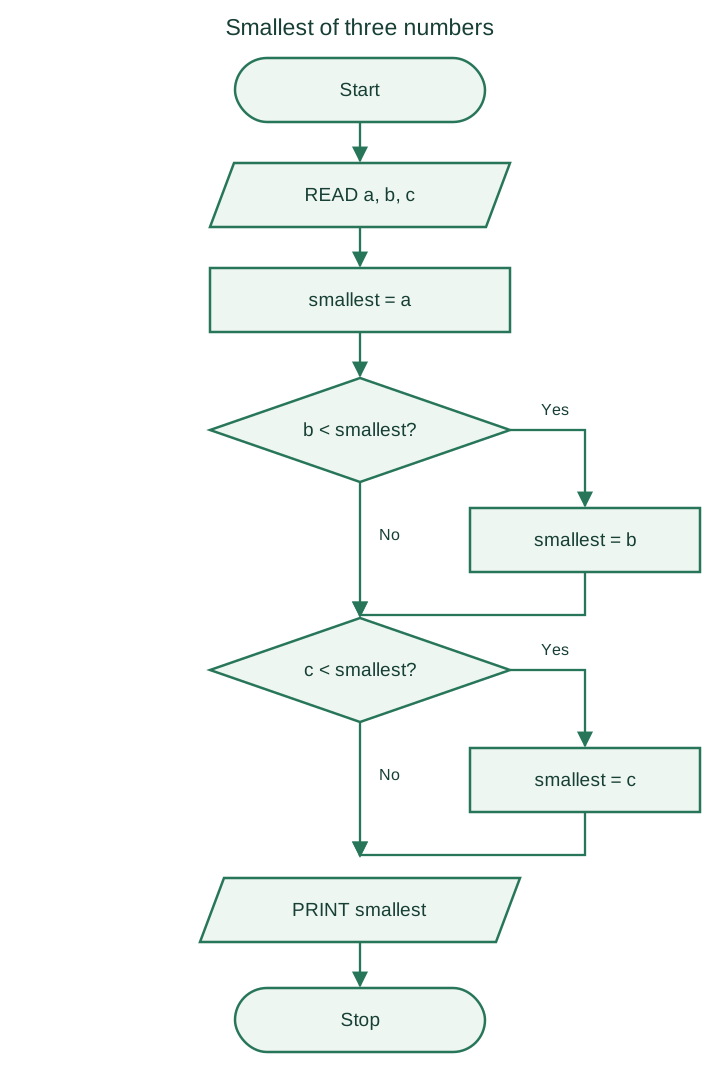
Trace: for (8, 8, 3), the candidate minimum starts at 8, stays at 8 after comparing the second value, then becomes 3. Ties do not break this method.
Page 9 of 50
Zoo-ticket selection
Use the following age bands for this separate exercise. They differ from the concert-ticket bands later in the module. Assume age is non-negative.
| Age | Fare |
|---|---|
START
READ age
IF age < 10 THEN
    SET fare = 7
ELSE IF age < 60 THEN
    SET fare = 10
ELSE
    SET fare = 5
END IF
PRINT fare
STOP
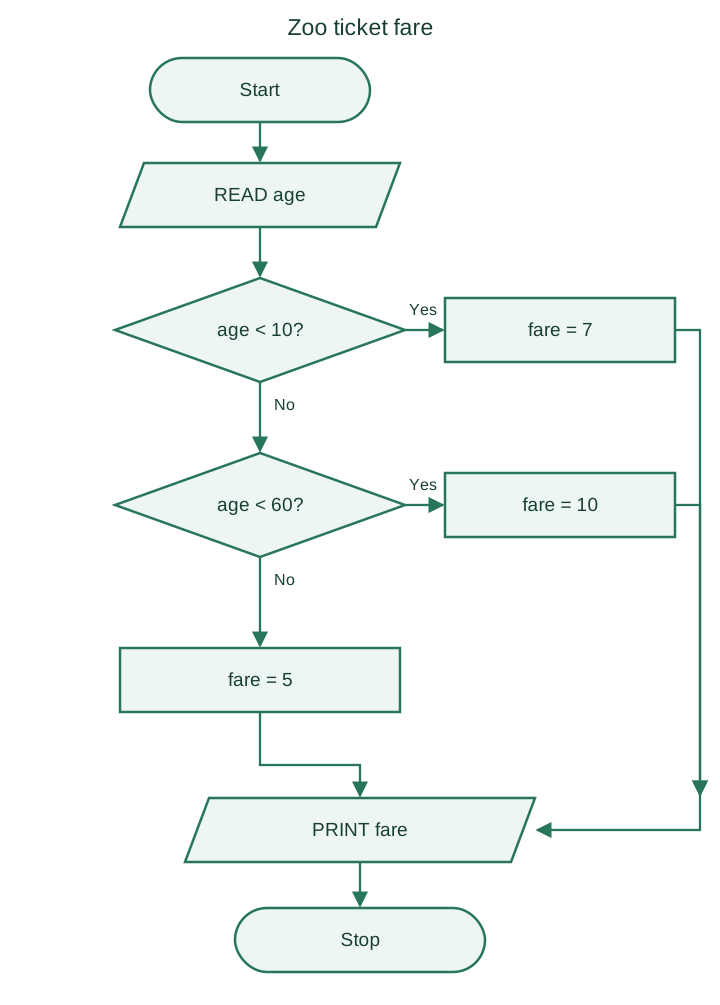
Boundary check: ages 9, 10, 59, and 60 should give fares 7, 10, 10, and 5 respectively.
Page 10 of 50
Select a colour from its code
| Code | Message |
|---|---|
| Red | |
| Green | |
| Blue | |
| Any other value | Wrong code |
PRINTCOLOUR
1  Start
2  READ(code)
3  caseof (code)
4    case ‘R’:
5      PRINT(“Red”)
6      break
7    case ‘G’:
8      PRINT(“Green”)
9      break
10   case ‘B’:
11     PRINT(“Blue”)
12     break
13   default :
14     PRINT(“Wrong code”)
15 endcase
16 Stop
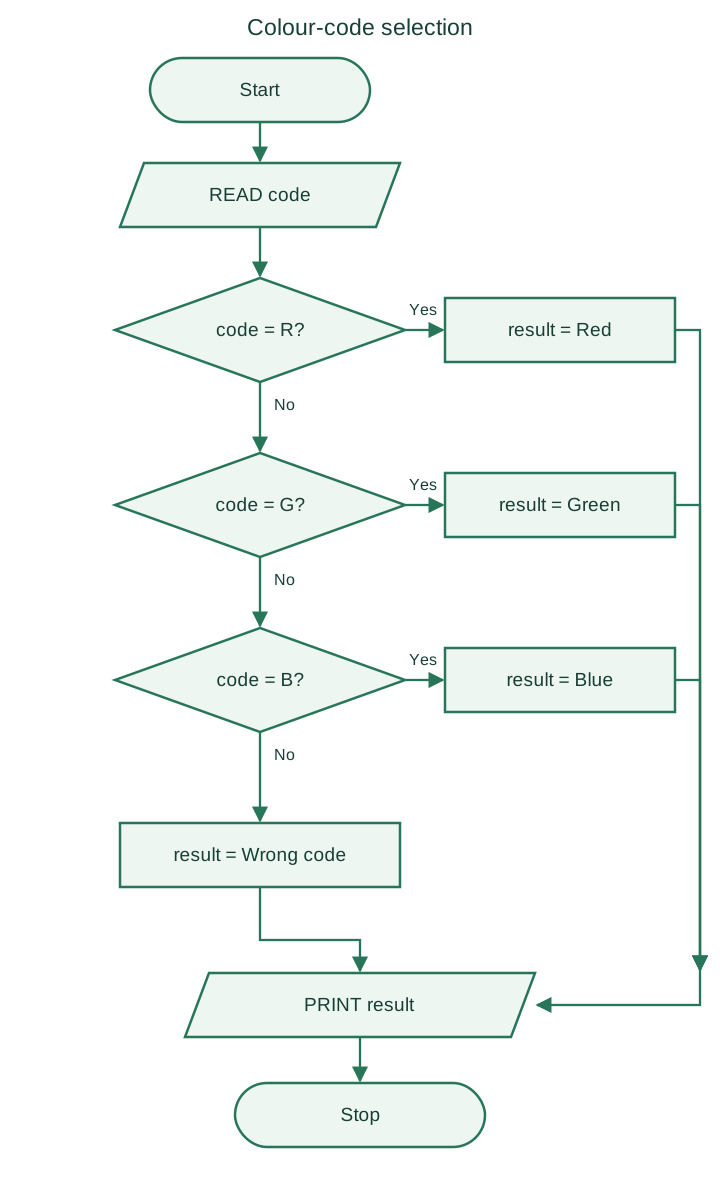
The OTHERWISE or default case handles an unrecognized code. Assume uppercase input; convert lowercase codes first if the program should accept them.
Page 11 of 50
Flowchart example: calculate a factorial
For a non-negative integer , the factorial is , and .
FACTORIAL
1. START
2. READ n
3. SET fact = 1
4. FOR i = 1 TO n
       SET fact = fact * i
   END FOR
5. PRINT fact
6. STOP
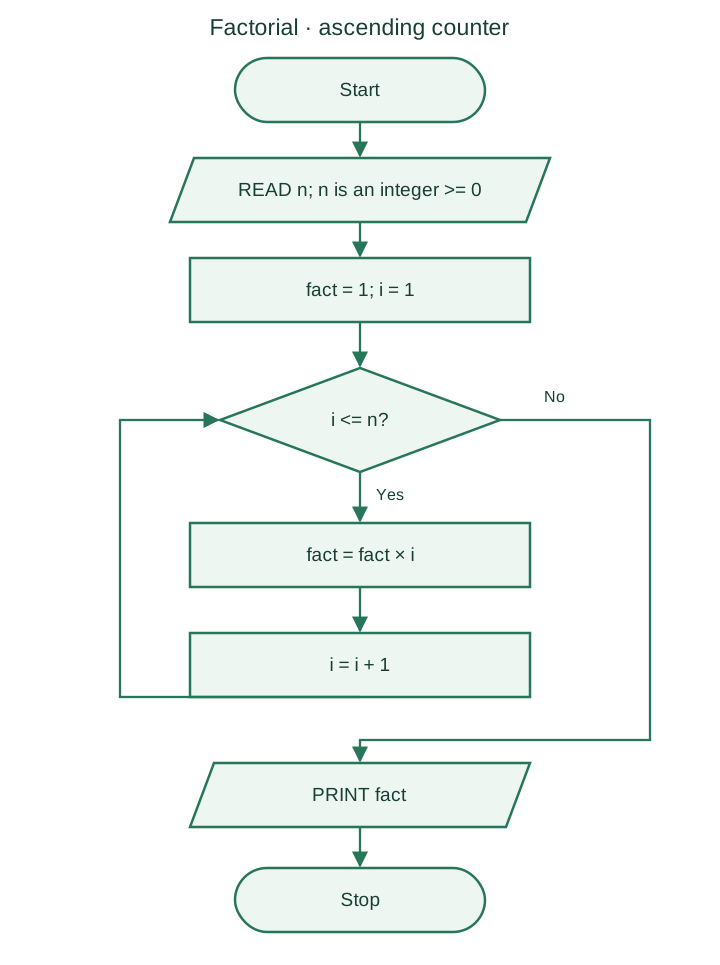
Trace for n = 4: the product becomes 1, 2, 6, then 24. Reject negative or non-integer inputs before this algorithm starts.
Page 12 of 50
Factorial with a descending counter
The same result can be found by starting at and counting down to 1. Initializing fact to 1 also handles , because the loop then runs zero times.
FACTORIAL
1. START
2. READ n
3. SET fact = 1
4. FOR i = n DOWN TO 1
       SET fact = fact * i
   END FOR
5. PRINT fact
6. STOP
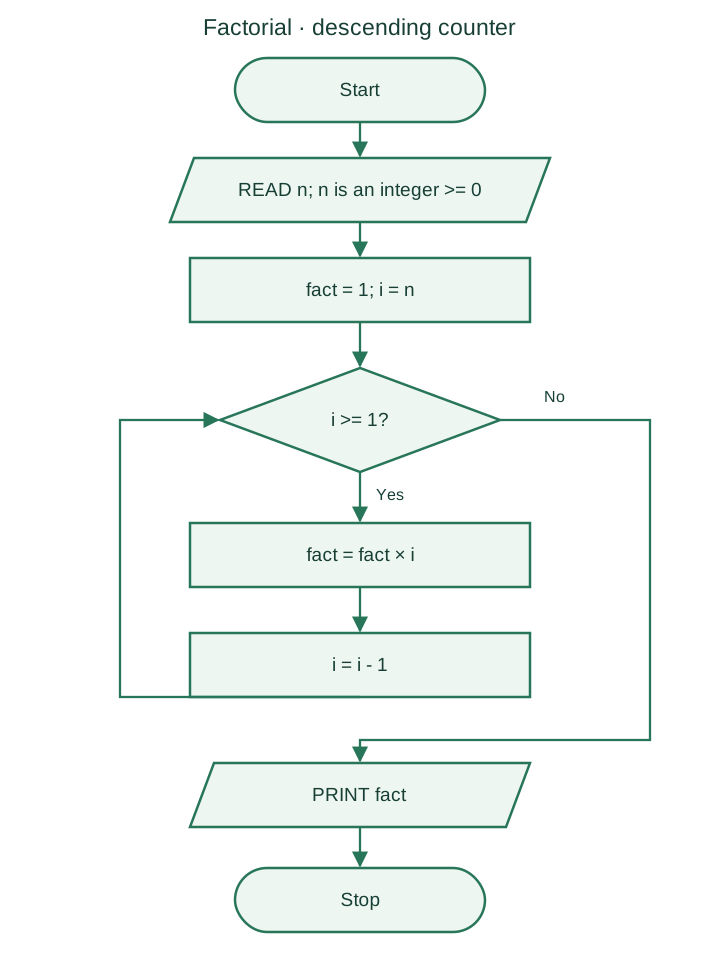
The product is unchanged by reversing the order of multiplication. The descending counter must decrease on every iteration so that the condition eventually becomes false.
Page 13 of 50
Average height by group
Maintain a separate total and count for each group. This version accepts B or G as group codes and positive heights. It rejects invalid records instead of silently assigning them to a group.
START
READ n
SET boys_total = 0, boys_count = 0
SET girls_total = 0, girls_count = 0
FOR i = 1 TO n
    READ group, height
    IF height <= 0 THEN
        PRINT "Invalid height; record skipped"
    ELSE IF group = "B" THEN
        SET boys_total = boys_total + height
        SET boys_count = boys_count + 1
    ELSE IF group = "G" THEN
        SET girls_total = girls_total + height
        SET girls_count = girls_count + 1
    ELSE
        PRINT "Unknown group; record skipped"
    END IF
END FOR
IF boys_count > 0 THEN
    PRINT boys_total / boys_count
ELSE
    PRINT "No data for boys"
END IF
IF girls_count > 0 THEN
    PRINT girls_total / girls_count
ELSE
    PRINT "No data for girls"
END IF
STOP
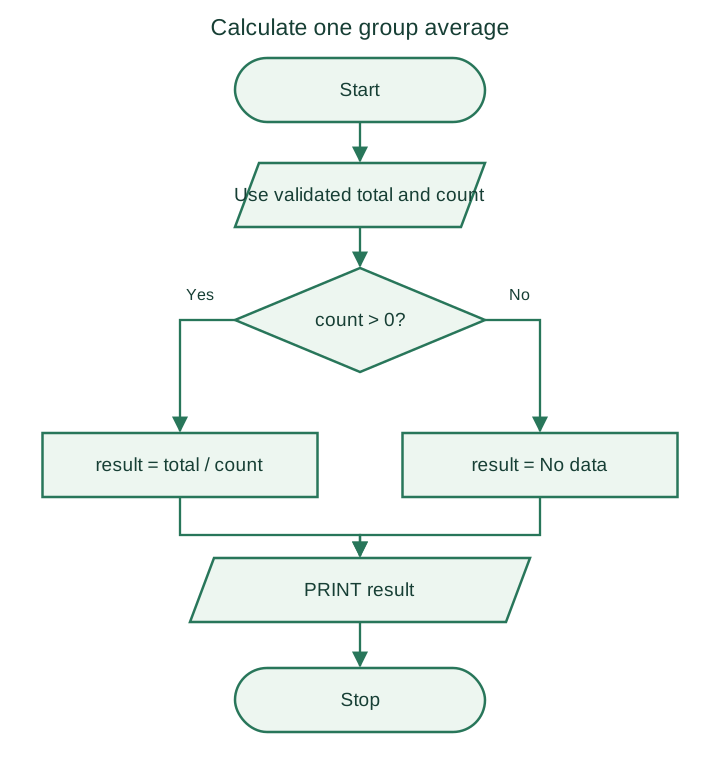
Trace: B, 160; G, 150; B, 170 gives a boys' average of 165 and a girls' average of 150. An empty group has no average; never divide by a zero count.
The SVG shows the final count check and average calculation; apply it separately to each group.
Page 14 of 50
References and further reading
- Algorithmic Thinking with Python, Ajeesh Ramanujan and Narasimhan T — source study material.
- Microsoft: flowchart shapes and their common uses.
- Python tutorial: conditions, loops, and range.
- Python tutorial: lists and data structures.
The worked examples use the rules stated beside each problem. Ticket prices, grade bands, and commission bands are exercise data, rather than real pricing or institutional policies.
Page 15 of 50
What makes a good algorithm?
An algorithm is a finite sequence of precise, executable steps for solving a problem. It may accept zero or more inputs and must produce the specified result for valid inputs.
| Property | What to check |
|---|---|
| Input and output | Are the required data and expected result clear? |
| Definiteness | Does every instruction have one clear meaning? |
| Effectiveness | Can each step actually be carried out? |
| Finiteness | Will the algorithm terminate for valid inputs? |
| Correctness | Do its steps meet the problem's requirements? |
A common structure is: read input, initialize variables, process the data, display the result, and stop. This is a useful pattern rather than a requirement that every algorithm must read input first.
Before writing the steps, state the assumptions: for example, a factorial needs a non-negative integer, and an average needs at least one value.
Page 16 of 50
Example: compare three numbers
READ a, b, c
IF a >= b AND a >= c THEN
    PRINT a, "is greatest"
ELSE IF b >= c THEN
    PRINT b, "is greatest"
ELSE
    PRINT c, "is greatest"
END IF
Example: area and perimeter of a square
For side length , the area is and the perimeter is .
READ a
SET area = a * a
SET perimeter = 4 * a
PRINT area, perimeter
Boundary check: for a = 8, b = 8, and c = 3, the greatest value is 8. Using >= prevents tied values from falling through to the wrong branch. For the square example, assume a non-negative side length; a side of 4 gives area 16 and perimeter 16.
Page 17 of 50
Example: swap two values
A temporary variable preserves the first value while the two values are exchanged.
READ a, b
SET temp = a
SET a = b
SET b = temp
PRINT a, b
Trace: if a = 4 and b = 9, then temp = 4, a = 9, and b = 4. A direct a = b followed by b = a would lose the original value of a.
Page 18 of 50
Why use pseudocode?
Pseudocode describes an algorithm in concise, structured language. It is designed for people to read, so it is not tied to the exact syntax of a programming language and cannot be executed directly.
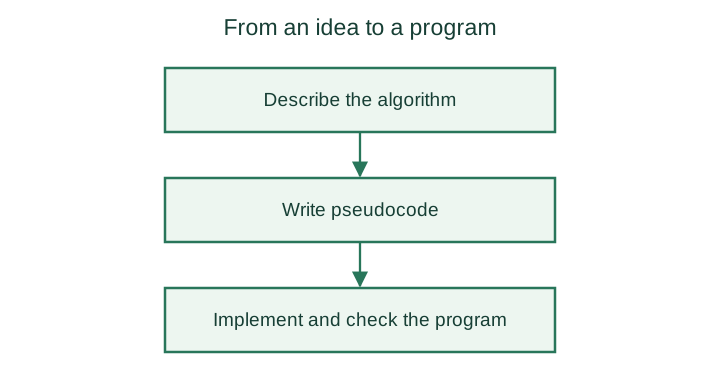
Pseudocode bridges an algorithm and its implementation: it makes the planned steps clear before they are translated into program code.
Benefits
- It is easy to read and understand
- It helps plan code before implementation
- It lets you review the logic before choosing language-specific syntax.
- It is helpful for documentation
- It can reveal gaps in the logic before coding.
Page 19 of 50
Rules for writing pseudocode
- Use consistent keywords for commands and control structures.
- Put one instruction on each line.
- Indent nested steps to show the structure clearly.
- Close each block with a matching keyword such as
END IF,END WHILE, orEND FOR. - Keep the notation independent of any one programming language.
- Use names that describe the problem.
- Keep the steps simple, concise, and readable.
Example: find the greatest of three numbers
READ a, b, c
SET greatest = a
IF b > greatest THEN
    SET greatest = b
END IF
IF c > greatest THEN
    SET greatest = c
END IF
PRINT greatest
Page 20 of 50
Flowchart symbol reference sheet
Use this SVG sheet when drawing or checking a flowchart. Each symbol has a distinct role; a process step, input/output step, and decision should remain visually different.
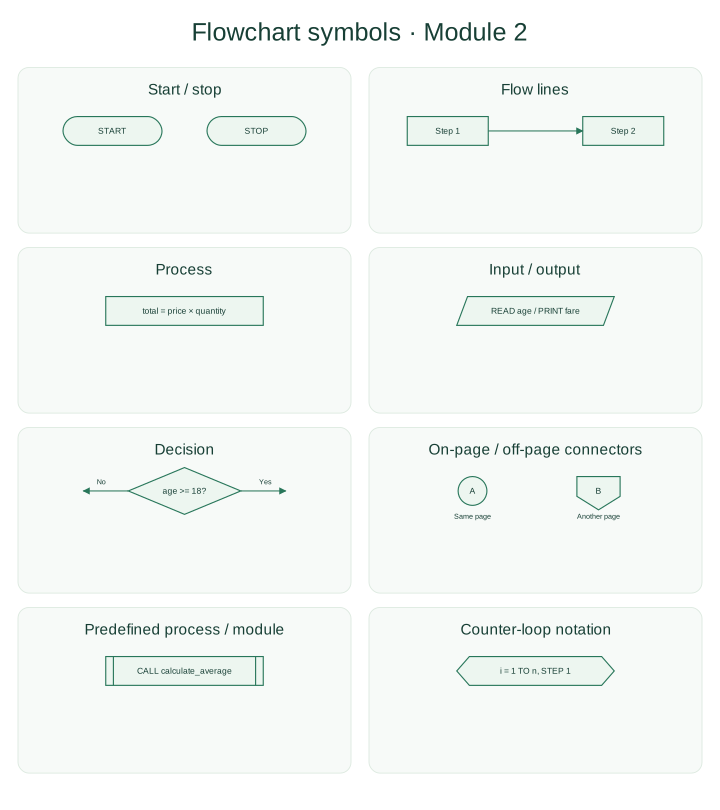
Check a finished chart by tracing at least one path through each decision. Every reachable branch must lead to another step or to a stop, and each loop must make progress toward its exit.
Page 21 of 50
Pseudocode constructs: sequence, selection, and repetition
Sequence
Instructions run in order, from top to bottom.
Selection
Selection chooses which instructions to run based on a condition. Common forms include a simple IF, an IF/ELSE, an IF/ELSE IF chain, and nested conditions.
Repetition
Repetition runs a group of instructions multiple times. Common loop forms include WHILE, FOR, and REPEAT/UNTIL.
Page 22 of 50
Simple and nested conditions
A simple IF runs its body only when the condition is true. IF/ELSE selects one of two branches.
IF condition THEN
    statements
END IF

IF condition THEN
    statements when true
ELSE
    statements when false
END IF
A nested condition is an IF inside another conditional block:
IF outer_condition THEN
    IF inner_condition THEN
        statements
    END IF
END IF
Page 23 of 50
Multiple choices with ELSE IF
An ELSE IF chain tests conditions in order. The first true branch runs; if none match, the ELSE branch runs.
IF grade = "A" THEN
    PRINT "Excellent"
ELSE IF grade = "B" THEN
    PRINT "Good"
ELSE IF grade = "C" THEN
    PRINT "Average"
ELSE
    PRINT "Review the grade"
END IF
Only one matching branch is selected.
Page 24 of 50
Case selection and parity checks
A case structure is useful when one value is compared with several specific alternatives.
READ colour_code
CASE colour_code OF
    "R": PRINT "Red"
    "G": PRINT "Green"
    "B": PRINT "Blue"
    OTHERWISE: PRINT "Unknown colour code"
END CASE
Example: test whether an integer is odd or even
READ number
IF number MOD 2 = 0 THEN
    PRINT "Even"
ELSE
    PRINT "Odd"
END IF
Page 25 of 50
Trace a factorial loop
For a non-negative integer , , and .
READ n
SET factorial = 1
FOR i = 1 TO n
    SET factorial = factorial * i
END FOR
PRINT factorial
When , the loop does not run and the initialized result remains 1.
| Iteration for n = 4 | i | factorial after multiplication |
|---|---|---|
| 1 | 1 | 1 |
| 2 | 2 | 2 |
| 3 | 3 | 6 |
| 4 | 4 | 24 |
Page 26 of 50
Problem-solving example: solve a jigsaw puzzle
When the reference picture is unavailable, trial and error can help narrow the choices. Use clues from shape, colour, and neighbouring pieces to avoid random attempts.
- Separate edge and corner pieces from the rest.
- Build the border using pieces with straight edges.
- Group interior pieces by colour or pattern.
- Try a piece in a likely location; if it does not fit, set it aside and test another.
- Join matching clusters and use the combined shape and image as new clues.
- Continue until the remaining gaps are filled, revisiting earlier choices when necessary.
Page 27 of 50
Problem-solving example: choose a restaurant using heuristics
A heuristic is a shortcut for narrowing a choice quickly; it does not prove that the chosen restaurant is the best. For example:
- Filter for places that are nearby and open at the planned time.
- Check recent reviews and the menu.
- Compare the price with your budget.
- Ask someone local for a recommendation if you are still unsure.
- Choose a suitable option and confirm its location and availability before leaving.
These rules reduce the options quickly. If the choice matters more, compare more information before deciding.
Page 28 of 50
Flowchart: test whether a number is odd or even
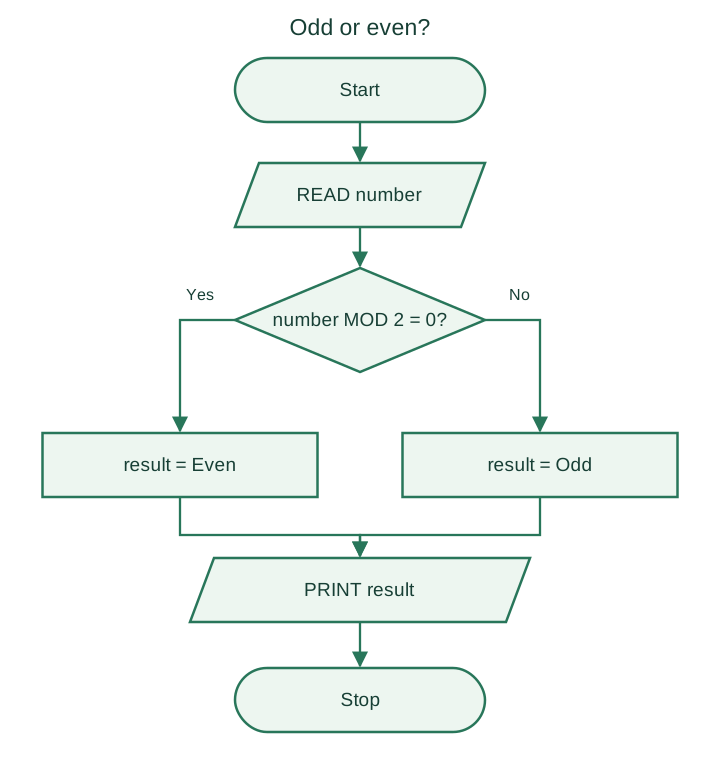
For an integer, a remainder of zero after division by 2 means even. A non-zero remainder means odd. This rule also works for zero and negative integers.
START
READ number
IF number MOD 2 = 0 THEN
    SET result = "Even"
ELSE
    SET result = "Odd"
END IF
PRINT result
STOP
| Input | Remainder modulo 2 | Result |
|---|---|---|
| 0 | 0 | Even |
| 6 | 0 | Even |
| 7 | 1 | Odd |
| -4 | 0 | Even |
Page 29 of 50
Concert-ticket pricing rules
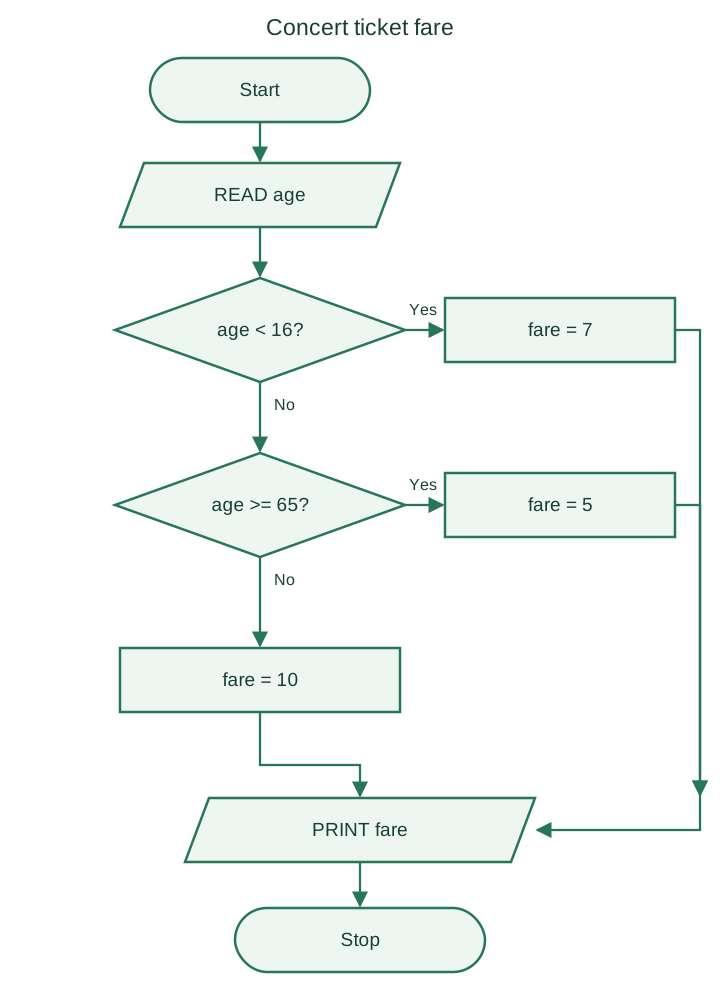
For this exercise, a ticket costs 7 for a person under 16, 5 for a person aged 65 or over, and 10 for everyone else. Assume age is a non-negative number.
| Age | Charge |
|---|---|
| Under 16 | 7 |
| 16 to under 65 | 10 |
| 65 or over | 5 |
- Read age.
- If age is under 16, set charge to 7.
- Otherwise, if age is at least 65, set charge to 5.
- Otherwise, set charge to 10.
- Display charge and stop.
Use one selection chain so exactly one band determines the price.
Page 30 of 50
Concert-ticket flowchart
A matching branch goes straight to the output. It must not continue into later price tests, which could overwrite the selected charge.
Page 31 of 50
Concert-ticket pseudocode
START
READ age
IF age < 16 THEN
    SET charge = 7
ELSE IF age >= 65 THEN
    SET charge = 5
ELSE
    SET charge = 10
END IF
PRINT charge
STOP
Notice that charge is calculated, not read as an input. The ELSE branch covers ages from 16 up to, but not including, 65.
Page 32 of 50
Check ticket-price boundaries
Boundary values are where an incorrect comparison is easiest to spot. Test the value immediately before a boundary and the boundary itself.
| Age | Expected concert charge | Why |
|---|---|---|
| 15 | 7 | Under 16 |
| 16 | 10 | First age in the standard band |
| 64 | 10 | Last whole-number age below 65 |
| 65 | 5 | First age in the senior band |
Also test a typical age in each band. If negative ages are possible in the input, reject them before applying the pricing rules.
Page 33 of 50
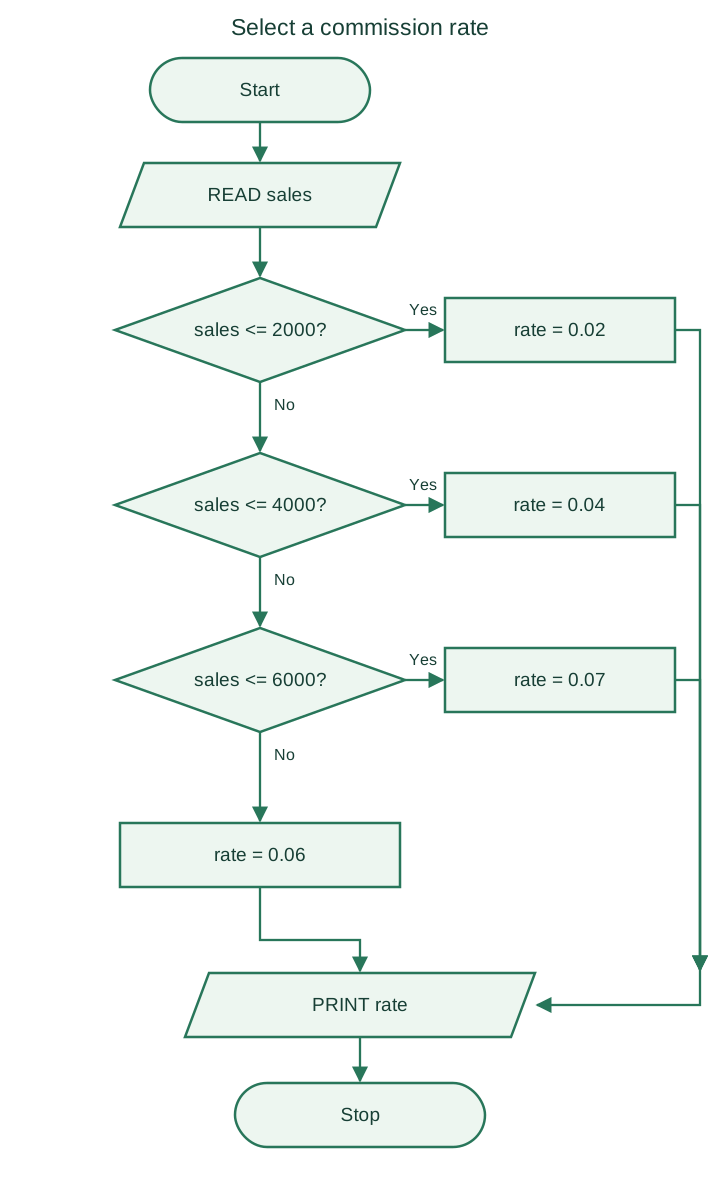
Commission-rate rules
This exercise assigns one rate to the entire sales amount. It does not apply progressive rates to separate portions of the sale.
| Sales amount | Rate | Decimal rate |
|---|---|---|
| 0 to 2000 inclusive | 2% | 0.02 |
| Over 2000 to 4000 inclusive | 4% | 0.04 |
| Over 4000 to 6000 inclusive | 7% | 0.07 |
| Over 6000 | 6% | 0.06 |
Assume sales is non-negative. The final band deliberately uses the 6% rate from the exercise. Selecting the rate and calculating the commission amount are different steps:
For sales of 3000, the rate is 0.04 and the commission amount is 120.
Page 34 of 50
Commission pseudocode
START
READ sales
IF sales < 0 THEN
    PRINT "Invalid sales amount"
ELSE
    IF sales <= 2000 THEN
        SET rate = 0.02
    ELSE IF sales <= 4000 THEN
        SET rate = 0.04
    ELSE IF sales <= 6000 THEN
        SET rate = 0.07
    ELSE
        SET rate = 0.06
    END IF
    SET commission = sales * rate
    PRINT rate, commission
END IF
STOP
Boundary check: sales of 2000, 4000, and 6000 use rates 0.02, 0.04, and 0.07 respectively. A value just above each boundary enters the next band.
Page 35 of 50
Commission-rate flowchart
After validating that sales is non-negative, select one rate using this chart. Calculate the amount as sales × rate when the question asks for the commission amount.
Page 36 of 50
Repeat-until loops
A repeat-until loop runs its body first, then checks its condition. It always runs at least once and stops when the condition becomes true.
REPEAT
    statements
UNTIL condition
For example, to print 1 through 10:
SET i = 1
REPEAT
    PRINT i
    SET i = i + 1
UNTIL i > 10
Python has no dedicated repeat-until statement. Use while True with a break after the body when the stopping condition is satisfied.
Page 37 of 50
Choose the right control structure
| Construct | Best suited to | Can run zero times? |
|---|---|---|
| IF / ELSE | Choosing between alternative actions | Not a loop |
| FOR | Visiting a known sequence or counter range | Yes, for an empty range |
| WHILE | Repeating while a condition is true | Yes |
| REPEAT / UNTIL | Doing something before checking whether to stop | No |
A loop's condition must be interpreted carefully: WHILE condition continues when the condition is true; UNTIL condition stops when the condition is true.
Example: to print 1 through 10, a while loop can continue while i <= 10, whereas a repeat-until loop can stop when i > 10. Both require an update such as i = i + 1.
Page 38 of 50
Module calls and loop setup
A module call names an already defined procedure, such as calculate_average(values). Its flowchart symbol shows that the work is delegated to that procedure; the procedure's own chart explains the internal steps.
Before a counter loop starts, define:
- Its start value.
- Its limit and whether that limit is included.
- Its step value.
- Any running totals or products needed by its body.
The course's hexagonal loop notation is a compact summary of these controls; it does not replace the loop body's instructions.
Page 39 of 50
Sum the first n natural numbers
For this example, sum the integers from 1 through , where is a non-negative integer. Initialize the total to 0, because no values have been added yet.
START
READ n
SET total = 0
SET i = 1
WHILE i <= n DO
    SET total = total + i
    SET i = i + 1
END WHILE
PRINT total
STOP
Trace for n = 3: the running total becomes 1, then 3, then 6. For n = 0, the loop runs zero times and the result is 0.
Check the result against . Keep variable names consistent: total, Total, and TOTAL can denote different names in a programming language.
Page 40 of 50
Example: calculate the average age of students
Read each student's age once, keep a running total, and divide by the number of students. Assume .
AVERAGE AGE
1. START
2. READ n
3. SET sum = 0, i = 1
4. REPEAT
       READ age
       SET sum = sum + age
       SET i = i + 1
   UNTIL i > n
5. SET average = sum / n
6. PRINT average
7. STOP
Check: three ages of 18, 20, and 22 give a total of 60 and an average of 20. Reject n <= 0 before entering this repeat-until loop.
Page 41 of 50
While loops
A while loop checks its condition before each iteration. The body may run zero times if the condition is false at the start.
WHILE condition DO
    statements
END WHILE
Print the integers from 1 through :
SET i = 1
WHILE i <= n DO
    PRINT i
    SET i = i + 1
END WHILE
A for loop is useful when the values or number of repetitions are known in advance. A countdown loop uses a decreasing step.
Watch out. If the body never changes a value used in the condition, the loop may never terminate. In this example, omitting
i = i + 1leaves the condition true indefinitely when n is positive.
Page 42 of 50
For loops and step values
A counter loop specifies its starting value, stopping value, and optional step. The end value is included in this pseudocode convention; Python's range() instead excludes its stop value.
FOR i = 1 TO n
    PRINT i
END FOR

FOR i = 10 TO 1 STEP -1
    PRINT i
END FOR
The step must be non-zero and point toward the stopping value. For the course’s DOWN TO notation, FOR i = 10 DOWN TO 1 already implies a decreasing counter.
Page 43 of 50
Review: selection and repetition patterns
Pseudocode makes control flow explicit. Indent the statements inside each block and close every block with its matching keyword.
IF condition THEN
    statements
ELSE
    statements
END IF

WHILE condition DO
    statements
END WHILE

FOR each item in sequence DO
    statements
END FOR
For example, FOR i = 1 TO n repeats a known number of times, while WHILE condition repeats until its condition becomes false.
Page 44 of 50
The Python range() function
range() produces integers from a start value up to, but not including, the stop value. The step may be positive or negative.
list(range(5))          # [0, 1, 2, 3, 4]
list(range(1, 10, 2))   # [1, 3, 5, 7, 9]
list(range(10, 0, -1))  # [10, 9, 8, 7, 6, 5, 4, 3, 2, 1]
A for loop can use the same ranges without building a list first:
for i in range(1, 6):
    print(i)
range(stop) starts at 0 and uses step 1. A zero step raises ValueError; range(1, 5, -1) is empty because a negative step cannot move 1 toward the upper bound 5.
Page 45 of 50
Examples: accumulation and repetition
Sum the first ten positive integers
total = 0
for number in range(1, 11):
    total += number
print(total)  # 55
Print the multiplication table of nine
for multiplier in range(1, 11):
    print(f"{multiplier} × 9 = {multiplier * 9}")
Initialize an additive accumulator to 0; initialize a multiplicative accumulator to 1. The multiplication-table loop visits 1 through 10 because its Python stop value is 11.
Page 46 of 50
Example: assign a grade with if and elif
The conditions are checked from top to bottom. Once one condition matches, the remaining branches are skipped.
mark = int(input("Enter the mark: "))

if not 0 <= mark <= 100:
    grade = "Invalid mark"
elif mark >= 90:
    grade = "A"
elif mark >= 80:
    grade = "B"
elif mark >= 70:
    grade = "C"
elif mark >= 60:
    grade = "D"
else:
    grade = "F"

print(f"Grade: {grade}")
Example: determine whether a year is a leap year
A year is a leap year when it is divisible by 400, or when it is divisible by 4 but not by 100.
year = int(input("Enter a year: "))
if year % 400 == 0 or (year % 4 == 0 and year % 100 != 0):
    print("Leap year")
else:
    print("Not a leap year")
Checks: marks 90, 89, 60, and 59 give A, B, D, and F. Years 1900, 2000, and 2024 are respectively not a leap year, a leap year, and a leap year.
Page 47 of 50
Example: solve a quadratic equation
For , the discriminant determines the roots. This example prints real roots and handles the case where .
import math

a = float(input("Enter a: "))
b = float(input("Enter b: "))
c = float(input("Enter c: "))

if a == 0:
    print("This is not a quadratic equation.")
else:
    discriminant = b**2 - 4 * a * c
    if discriminant > 0:
        root1 = (-b + math.sqrt(discriminant)) / (2 * a)
        root2 = (-b - math.sqrt(discriminant)) / (2 * a)
        print("Two real roots:", root1, "and", root2)
    elif discriminant == 0:
        print("One real root:", -b / (2 * a))
    else:
        print("There are no real roots.")
The complex roots for a negative discriminant can be found with cmath.sqrt().
Checks: (a,b,c) = (1,-3,2) gives roots 2 and 1; (1,2,1) gives -1; (1,0,1) has no real roots. The a = 0 branch prevents division by zero. This introductory example uses an exact discriminant comparison; floating-point roundoff can require a tolerance in numerical applications.
Page 48 of 50
Additional Python practice: list indexing and slicing
fruits = ["apple", "mango", "grapes"]
print(fruits[1:3])   # ['mango', 'grapes']
print(fruits[-1])    # 'grapes'
print(fruits[-3:-1]) # ['apple', 'mango']
print(fruits[1:])    # ['mango', 'grapes']
print(fruits[:2])    # ['apple', 'mango']

fruits[1] = "orange"
print(fruits)        # ['apple', 'orange', 'grapes']
fruits[1:2] = ["cherry", "pineapple"]
print(fruits)        # ['apple', 'cherry', 'pineapple', 'grapes']
An index selects one item; a slice selects a new list. Slice start is included and stop is excluded. Negative indices count from the end. Reading a slice does not change the original list; assigning to an index or slice does.
Page 49 of 50
Sorting and iterating over a list
fruits = ["apple", "mango", "grapes"]
fruits.sort()
print(fruits)  # ['apple', 'grapes', 'mango']

fruits.sort(reverse=True)
print(fruits)  # ['mango', 'grapes', 'apple']

for fruit in fruits:
    print(fruit)

for i in range(len(fruits)):
    print(i, fruits[i])
NumPy arrays
NumPy is an optional third-party library for working with arrays. Install it before using this example.
import numpy as np

arr = np.array([1, 2, 3, 4])
print(arr)        # [1 2 3 4]
print(type(arr))  # <class 'numpy.ndarray'>
sort() changes the list in place and returns None; sorted(fruits) returns a new sorted list. reverse() reverses the current order rather than sorting. NumPy is additional practice and is not needed for the core algorithm and flowchart exercises.
Page 50 of 50
Replacing part of a list with slice assignment
A slice assignment replaces the selected range with items from an iterable. The replacement may contain a different number of items, changing the list length. Use a list even when replacing the slice with one item.
numbers = [10, 20, 30, 40, 50]

numbers[1:3] = [35, 45]
print(numbers)  # [10, 35, 45, 40, 50]

numbers[1:3] = [23, 27, 28]
print(numbers)  # [10, 23, 27, 28, 40, 50]

numbers[1:3] = [68]
print(numbers)  # [10, 68, 28, 40, 50]
The last slice replaces only 23 and 27, so 28 remains in the list.
Assigning numbers[1:3] = 68 raises TypeError because the right side is not iterable. Use [68] to replace a slice with one item, or numbers[1] = 68 to replace a single indexed item.