
Page 1 of 29
Module 3 overview
This module develops the Python skills needed to control a program, divide its work into functions, and organize data in collections.
| Topic | What you should be able to do |
|---|---|
| Control flow | Choose branches, repeat actions, and trace loop execution |
| Functions | Define parameters, pass arguments, return results, and separate tasks |
| Strings and sequences | Index, slice, traverse, and transform ordered data |
| Lists and tuples | Choose between mutable and immutable sequences |
| NumPy arrays | Inspect shapes, select elements, reshape, and perform matrix operations |
| Sets and dictionaries | Work with unique values and key–value associations |
The examples use Python 3. Code blocks contain runnable programs; output comments show the expected result. NumPy examples require the separately installed numpy package.
Key idea. Choose a collection by how you need to use it: positions suggest a sequence, unique membership suggests a set, and lookup by a meaningful key suggests a dictionary.
Page 2 of 29
Sequence and one-way selection
Sequence means executing statements in order. Selection chooses which statements to execute. Repetition executes a block repeatedly. Python uses indentation to mark the blocks belonging to conditions, loops, and functions.
a = 20
b = 10
print("Difference:", a - b)  # Difference: 10
print("Sum:", a + b)         # Sum: 30
print("Product:", a * b)     # Product: 200
A one-way if runs its body only when its condition is true. Execution then continues after the block, whether or not the body ran.
number = 8
if 0 < number < 10:
    print("Positive single-digit number")
print("Check complete")
The condition deliberately excludes 0 because it asks for a positive single-digit integer. Assume number is an integer. Use lowercase if, finish the header with a colon, and indent its body consistently.
Page 3 of 29
Two-way and multi-way selection
An if/else selects exactly one of two branches. This exercise classifies ages below 18 as minors; assume age is non-negative.
age = 12
if age >= 18:
    print("Adult")
else:
    print("Minor")  # Minor
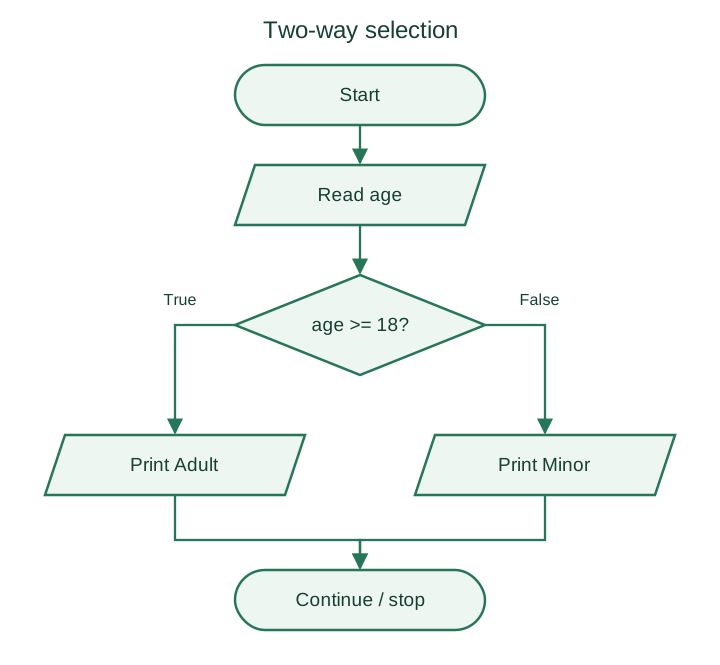
An if/elif/else chain checks conditions from top to bottom and runs the first matching branch. The example below uses illustrative grade bands, not an institutional grading policy.
def grade_for(mark):
    if not 0 <= mark <= 100:
        return "Invalid mark"
    if mark >= 90:
        return "S"
    elif mark >= 80:
        return "A"
    elif mark >= 70:
        return "B"
    elif mark >= 60:
        return "C"
    elif mark >= 50:
        return "D"
    elif mark >= 40:
        return "E"
    else:
        return "F"

print(grade_for(98))  # S
print(grade_for(45))  # E
print(grade_for(39))  # F
Use and to combine Boolean conditions, or write a chained comparison such as 80 <= mark < 90. The & operator is bitwise AND and is not a substitute for and in these scalar comparisons. Here, descending thresholds make a second upper-bound check unnecessary.
Check boundaries: 100 and 90 give S, 89 gives A, 40 gives E, and 39 gives F. Values outside 0–100 are invalid.
Page 4 of 29
For loops, range, and while loops
A for loop visits each item in an iterable. Use range() for an integer counter sequence. Its stop value is excluded.
for number in range(5):
    print(number, end=" ")
print()  # The preceding line prints: 0 1 2 3 4

print(list(range(2, 6)))      # [2, 3, 4, 5]
print(list(range(1, 10, 2)))  # [1, 3, 5, 7, 9]
print(list(range(10, 0, -2))) # [10, 8, 6, 4, 2]
| Form | Meaning |
|---|---|
range(stop) | Start at 0, step by 1 |
range(start, stop) | Use the given start, step by 1 |
range(start, stop, step) | Use an explicit positive or negative step |
A zero step raises ValueError. A range is empty when its step points away from the stop value; for example, range(1, 5, -1).
A while loop checks its condition before every iteration. It can run zero times and is useful when the repetition count is not known in advance.
count = 3
while count > 0:
    print(count)
    count -= 1
print("Done")
# Output, one value per line: 3, 2, 1, Done
Always check how the loop makes progress. Removing count -= 1 from this example would prevent termination.
Page 5 of 29
Nested loops and loop-control statements
A nested loop runs an inner loop during each iteration of an outer loop. If both ranges have fixed lengths, the total number of inner-body executions is their product.
for row in range(3):
    for column in range(1, 5):
        print(column, end=" ")
    print()
# Three rows, each containing: 1 2 3 4
| Statement | Effect |
|---|---|
break | Exit the innermost enclosing loop immediately |
continue | Skip the remaining statements of the current iteration |
pass | Do nothing; it is a placeholder, not a loop jump |
for number in range(1, 6):
    if number == 3:
        break
    print(number, end=" ")
print()  # Preceding line: 1 2

for number in range(1, 6):
    if number % 2 == 0:
        continue
    print(number, end=" ")
print()  # Preceding line: 1 3 5

for number in range(1, 4):
    if number == 2:
        pass
    print(number, end=" ")
print()  # Preceding line: 1 2 3
In nested loops, break exits the inner loop containing it, not every enclosing loop. In a while loop, ensure that continue does not skip the update needed for termination.
Page 6 of 29
Short-circuit evaluation
Python evaluates logical operands from left to right. For and, it skips the right operand when the left is false. For or, it skips the right operand when the left is true.
numerator = 10
denominator = 0
if denominator != 0 and numerator / denominator > 0:
    print("Positive quotient")
else:
    print("Zero denominator or non-positive quotient")
The division is skipped when denominator is zero. Testing denominator > 0 would also avoid zero division, but would unnecessarily reject negative non-zero denominators. Put a required safety check before the operation it protects.
values = []
if values and values[0] > 0:
    print("First value is positive")

name = ""
display_name = name or "Guest"
print(display_name)  # Guest
and and or return one of their operands, which is not necessarily a Boolean. Use bool(...) when an explicit Boolean result is required. Short-circuiting can save work, but the order must first preserve the intended logic and required side effects.
Page 7 of 29
Functions and modular design
A function is a named, reusable block of code. Decomposition breaks a larger problem into smaller tasks. Modular design organizes those tasks behind clear interfaces so that each part can be understood and checked separately.
Functions reduce duplicated logic, hide implementation detail, and make individual tasks easier to reuse, debug, and test.
def add_numbers(first, second):
    """Return the sum of two numbers."""
    total = first + second
    return total

answer = add_numbers(6, 8)
print(answer)  # 14
| Part | Example | Purpose |
|---|---|---|
| Definition keyword | def | Create a function definition |
| Name | add_numbers | Identify the function |
| Parameters | first, second | Names receiving the call's values |
| Body | Indented statements | Perform the task |
| Return | return total | Exit this call and give a result to its caller |
A Python module is usually a .py file containing definitions and statements. It may contain several functions; module and function are not interchangeable terms.
A definition must execute before the function is called. A function may contain multiple return statements, and a return need not be the last written line of the function.
Page 8 of 29
Arguments, parameters, and return values
A parameter is a name in a function definition. An argument is a value supplied in a call. A function can receive arguments, return a result, do both, or do neither explicitly.
def greet():
    print("Hello")

def show_sum(first, second):
    print(first + second)

def default_limit():
    return 10

def add_numbers(first, second):
    return first + second

greet()                     # Hello
show_sum(3, 5)              # 8
print(default_limit())     # 10
print(add_numbers(10, 15))  # 25
| Function | Takes arguments? | Explicitly returns a useful value? |
|---|---|---|
greet() | No | No |
show_sum(first, second) | Yes | No |
default_limit() | No | Yes |
add_numbers(first, second) | Yes | Yes |
Every Python function returns a value. Without an explicit return value, it returns None. Printing displays something; it does not pass that displayed value back to the caller.
def display_total(first, second):
    print(first + second)

result = display_total(2, 3)  # Prints 5
print(result)                # None
Prefer returning results when the caller may need them for further calculations. Avoid naming a function sum, which hides Python's built-in sum() within the same scope.
Page 9 of 29
Function calls and worked examples
A caller supplies arguments, the function computes its result, and control returns to the caller. Parameters and variables assigned inside a function are normally local to that function.
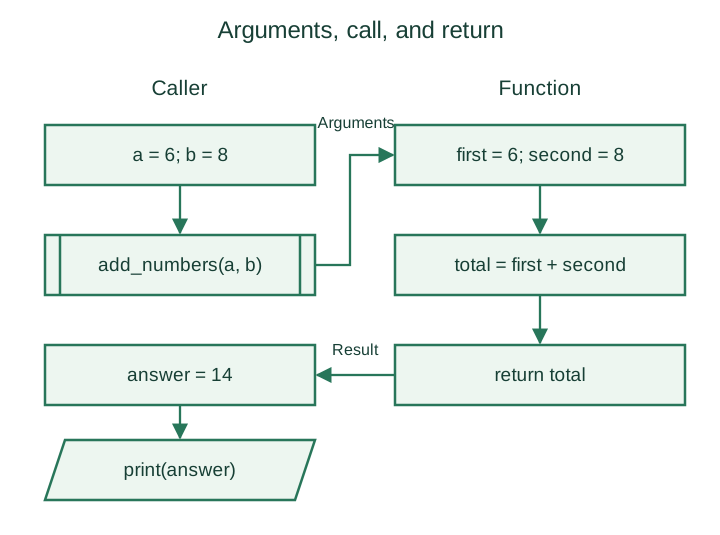
def absolute_value(number):
    if number < 0:
        return -number
    return number

def is_even(number):
    return number % 2 == 0

print(absolute_value(-7))  # 7
print(absolute_value(0))   # 0
print(is_even(8))          # True
print(is_even(-3))         # False
A pattern-printing function needs to be called; defining it alone produces no pattern.
def print_odd_pattern(rows):
    for row in range(1, rows + 1):
        for number in range(1, 2 * row, 2):
            print(number, end=" ")
        print()

print_odd_pattern(4)
# 1
# 1 3
# 1 3 5
# 1 3 5 7
Assume rows is a non-negative integer. A value of 0 prints no rows. Avoid names such as abs for variables because they hide useful built-in functions.
Page 10 of 29
Sequences and Unicode strings
A sequence is ordered: its items have positions and can be accessed by index. Strings, lists, and tuples are common sequence types; range is another sequence type.
| Type | Holds | Can its items be reassigned? |
|---|---|---|
str | Unicode text characters | No |
list | References to arbitrary Python objects | Yes |
tuple | References to arbitrary Python objects | No |
A Python string is an immutable sequence of Unicode code points. Python code does not need a terminating null character to determine its length. A character is not necessarily one byte; encoded byte length depends on the encoding and the text.
text = "Hello World"
print(len(text))      # 11
print(text[0])        # H
print(text[-1])       # d
print(len("café"))    # 4
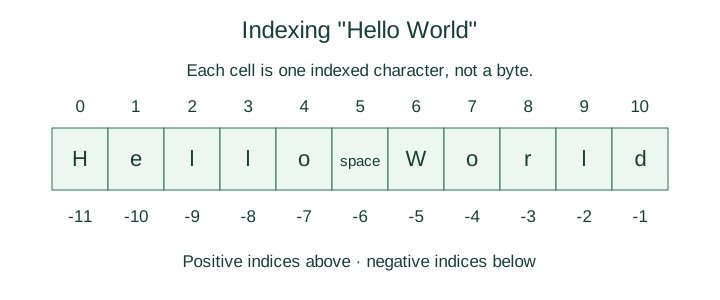
This is an index diagram, not a physical memory layout. len() counts code points, which can differ from the number of user-perceived characters when combining marks or multi-code-point emoji are used.
Page 11 of 29
String indexing, traversal, and immutability
For a string of length , valid non-negative indices run from 0 to . Negative indices count from the end, starting at -1.
text = "Try out!"
print(text[-1])  # !
print(text[-3])  # u
print(len(text)) # 8
# text[-9] would raise IndexError: the index is out of range.
An out-of-range access is an indexing error; it is unrelated to whether a string is mutable. Immutability means that assigning to an existing character, such as text[0] = "t", raises TypeError.
Create a new string when a change is needed:
text = "python"
changed = "P" + text[1:]
print(changed)  # Python
print(text)     # python

for character in "Hi there":
    print(repr(character), end=" ")
print()
# 'H' 'i' ' ' 't' 'h' 'e' 'r' 'e'
Traversal includes spaces and punctuation. repr() makes an otherwise hard-to-see space visible in the output.
print("Python" + " " + "Program")  # Python Program
print("Order!" * 3)                 # Order!Order!Order!
Concatenation does not add spaces automatically. Repetition requires an integer multiplier.
Page 12 of 29
String slicing, comparison, and membership
The slice text[start:stop:step] selects characters from the inclusive start up to the exclusive stop. Start and stop can be omitted; step defaults to 1 and cannot be zero.
text = "Python, Java and C++"
print(text[:6])    # Python
print(text[8:12])  # Java
print(text[-3:])   # C++
print(text[::-1])  # ++C dna avaJ ,nohtyP
print(repr(text[4:4]))  # ''
print(text[100:])       # Empty string; slicing clips out-of-range bounds
With a positive step, a slice whose start is not before its stop is empty. With a negative step, selection runs backwards. An invalid individual index raises IndexError, whereas an out-of-range slice boundary is clipped.
Strings compare lexicographically by Unicode code point, not by language-specific dictionary order. Comparison is case-sensitive.
print("python" == "Python")  # False
print("C" < "Java")          # True
print("A" < "a")             # True
print("Java" in "Python, Java and C++")  # True
print("Java" in "Python")               # False
Use casefold() when a case-insensitive text comparison is appropriate. The string membership operator checks for a substring, not only a single character.
Page 13 of 29
String methods
String methods are called directly on a string. They do not require import string. Because strings are immutable, transformation methods return new strings.
| Method | Result |
|---|---|
s.count(sub[, start[, end]]) | Count non-overlapping occurrences of a substring |
s.find(sub[, start[, end]]) | First matching index, or -1 when no match exists |
s.replace(old, new[, count]) | A copy with replacements; optionally limit their count |
s.isalpha() | True for a non-empty string containing only letters |
s.isdigit() | True for a non-empty string containing only digit characters |
s.lower(), s.upper() | A copy with case changed |
s.strip() | A copy with leading and trailing whitespace removed |
Square brackets in the signatures indicate optional arguments; do not type them in a call.
text = "malayalam"
print(text.find("al"))        # 1
print(text.find("al", 2))     # 5
print(text.find("al", 2, 5))  # -1
print(text.count("al"))       # 2
print(text.replace("la", "pq"))     # mapqyapqm
print(text.replace("la", "pq", 1))  # mapqyalam
print(text)                  # malayalam
print("STR2".isalpha())       # False
print("".isdigit())           # False
isalpha() and isdigit() recognize more than ASCII letters and digits. A true isdigit() result does not guarantee that every such Unicode character is accepted by int(); use conversion with error handling when validating numeric input.
Page 14 of 29
String constants and counting characters
The separate string module supplies constants such as ASCII letters and digits. These constants are useful when a problem specifically restricts its input to ASCII.
import string

print(string.ascii_lowercase)  # abcdefghijklmnopqrstuvwxyz
print(string.ascii_uppercase)  # ABCDEFGHIJKLMNOPQRSTUVWXYZ
print(string.digits)           # 0123456789
print("p" in string.ascii_lowercase)  # True
print("é" in string.ascii_letters)    # False
print("é".isalpha())                  # True
To count a single character without calling count(), traverse the string and increment a counter for each match.
def count_character(text, target):
    if len(target) != 1:
        raise ValueError("target must contain exactly one character")
    total = 0
    for character in text:
        if character == target:
            total += 1
    return total

print(count_character("banana", "a"))  # 3
print(count_character("banana", "z"))  # 0
print(count_character("", "a"))        # 0
This function counts one character at a time. Counting a multi-character substring requires a different approach, such as text.count(substring).
Page 15 of 29
Creating, indexing, and traversing lists
A list is an ordered, mutable sequence. Items may have different types, and a list may contain other lists.
items = [10, "hi", 3.14]
nested = [10, 20, [25, 30], 40]
print(len(items))    # 3
print(len(nested))   # 4; the nested list counts as one item
print(nested[2])     # [25, 30]
print(nested[2][1])  # 30
print(nested[-1])    # 40
print(list(range(10, 30, 5)))  # [10, 15, 20, 25]
List indices must be integers or slices. An expression such as nested[5 - 4] is valid because it evaluates to the integer 1. nested[1.0] raises TypeError, even though 1.0 is numerically equal to 1.
primes = [2, 3, 5, 7, 11]
for value in primes:
    print(value, end=" ")
print()  # Preceding line: 2 3 5 7 11

for index, value in enumerate(primes):
    print(index, value)
Use enumerate() when both positions and values are needed. An empty list is [], and len([]) is 0. Avoid changing a list's size while traversing it unless the algorithm deliberately accounts for that change.
Page 16 of 29
List comprehensions and operations
A list comprehension builds a new list by evaluating an expression for items in an iterable, optionally filtering with a condition. It need not start from an existing list.
numbers = [1, 28, 73, 4, 100, 358, 75, 208]
odd = [number for number in numbers if number % 2 != 0]
squares = [number ** 2 for number in range(1, 5)]
print(odd)      # [1, 73, 75]
print(squares)  # [1, 4, 9, 16]
print(list(range(10, 20, 2)))  # [10, 12, 14, 16, 18]
| Operation | Example | Meaning |
|---|---|---|
| Concatenation | [2, 3] + [5, 7] | New list combining both sequences |
| Repetition | [0, 1] * 2 | New list [0, 1, 0, 1] |
| Equality | [2, 4] == [2, 4] | Same values in the same order |
| Membership | 4 in [2, 4, 6] | Whether a value occurs |
| Ordering | [2, 3, 7] < [2, 4, 6] | Lexicographic comparison |
Lists compare element by element, stopping at the first unequal pair. If one is a prefix of the other, the shorter list comes first. Ordering elements of incompatible types, such as an integer and a string, can raise TypeError.
Watch out. Repetition copies references, not nested objects.
[[]] * 3contains three references to the same inner list. Use[[] for _ in range(3)]when independent inner lists are required.
Page 17 of 29
List slices, mutation, and copying
Lists use the same start-inclusive, stop-exclusive slicing rules as strings. A list slice creates a new list, but it is a shallow copy: references to nested objects are shared.
values = [10, 20, 30, 40]
print(values[1:3])  # [20, 30]
values[2] = 35
print(values)       # [10, 20, 35, 40]

alias = values
copy = values[:]
alias[0] = 99
print(values)  # [99, 20, 35, 40]
print(copy)    # [10, 20, 35, 40]
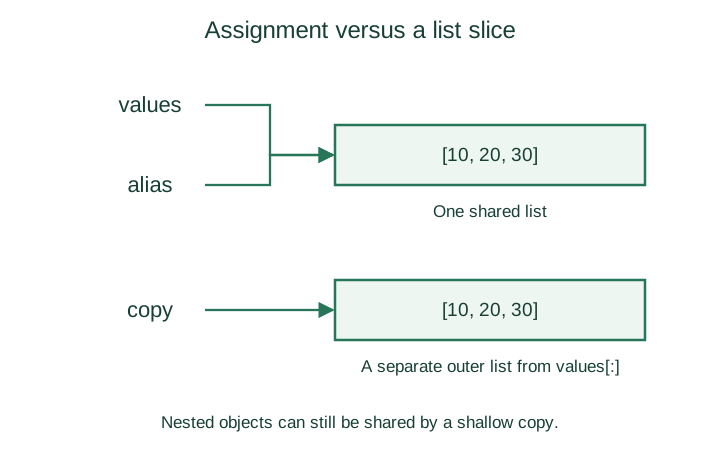
original = [[1], [2]]
shallow = original[:]
shallow[0].append(9)
print(original)  # [[1, 9], [2]]
Reassigning an element in a shallow copy changes that copy's slot; mutating a shared nested object is visible through both lists. Use copy.deepcopy() when the task requires independently copied nested structures.
Page 18 of 29
Replacing, inserting, and deleting list items
An indexed assignment replaces one item. A slice assignment replaces a range with values from an iterable and may change the list's length.
values = [10, 20, 30, 40, 50]
values[1:3] = [25, 35]
print(values)  # [10, 25, 35, 40, 50]

values[2:2] = [27, 29]
print(values)  # [10, 25, 27, 29, 35, 40, 50]

values[1:4] = []
print(values)  # [10, 35, 40, 50]

del values[1]
print(values)  # [10, 40, 50]
del values[1:]
print(values)  # [10]
An empty slice such as [2:2] inserts before position 2. Assigning [] to a slice removes the selected range. In contrast, values[0] = [] stores an empty list as an item; it does not remove that position.
The right side of a slice assignment must be iterable. values[0:1] = 7 raises TypeError; use [7] instead. Deleting one out-of-range index raises IndexError, while deleting an out-of-range slice safely clips its bounds.
Page 19 of 29
List methods
Use this text reference in place of a screenshot so method names and arguments remain selectable.
| Method | Effect or result |
|---|---|
items.index(value) | First matching index; ValueError if absent |
items.insert(index, value) | Insert before an index; an index past the end appends |
items.append(value) | Add one object at the end |
items.extend(iterable) | Append each item from an iterable |
items.remove(value) | Remove the first match; ValueError if absent |
items.pop() / items.pop(index) | Remove and return an item; IndexError for an invalid index or empty list |
items.count(value) | Number of matching items |
items.sort(key=..., reverse=...) | Sort the list in place; return None |
items.reverse() | Reverse the current order in place; return None |
items.clear() | Remove every item |
items.copy() | Make a shallow copy |
values = [3, 1, 3]
print(values.index(3))  # 0
values.insert(1, 9)
values.append(5)
values.extend([7, 8])
print(values)          # [3, 9, 1, 3, 5, 7, 8]
print(values.pop())    # 8
values.remove(3)
print(values)          # [9, 1, 3, 5, 7]
print(values.count(3)) # 1
values.sort()
print(values)          # [1, 3, 5, 7, 9]
values.reverse()
print(values)          # [9, 7, 5, 3, 1]
append([7, 8]) adds a nested list as one item; extend([7, 8]) adds two items. Use sorted(items) to obtain a sorted copy. Do not write items = items.sort(), which replaces the variable with None.
Page 20 of 29
Lists with functions, split, and join
A function can return a list. Returning a container of values is different from printing those values. This function returns up to three largest values without changing its input:
def top_three(values):
    return sorted(values, reverse=True)[:3]

numbers = [23, 1, 78, 50, 100, -5]
print(top_three(numbers))  # [100, 78, 50]
print(numbers)             # [23, 1, 78, 50, 100, -5]
print(top_three([4]))      # [4]
print(top_three([]))       # []
A function receives references to the supplied objects. Mutating a list parameter can change the caller's list; merely rebinding that parameter to another list does not rebind the caller's variable.
text = "two words"
print(list(text))    # ['t', 'w', 'o', ' ', 'w', 'o', 'r', 'd', 's']
print(text.split()) # ['two', 'words']
print(text.split("w"))  # ['t', 'o ', 'ords']
print(text.split("wo")) # ['t', ' ', 'rds']

words = ["three", "word", "string"]
print(" ".join(words))  # three word string
print("-".join(words))  # three-word-string
split() without an argument groups consecutive whitespace and drops leading or trailing whitespace. An explicit separator follows different rules and can produce empty items: "a,,b".split(",") gives ['a', '', 'b']. join() requires string items and inserts its separator between them.
Page 21 of 29
Tuples and unpacking
A tuple is an immutable sequence. Commas create tuple structure; parentheses are often used for clarity.
record = ("Ram", 18, "S1")
single = ("a",)
not_a_tuple = ("a")
print(type(single).__name__)       # tuple
print(type(not_a_tuple).__name__)  # str
print(tuple("python"))            # ('p', 'y', 't', 'h', 'o', 'n')
print(tuple())                    # ()
print(record[0])                  # Ram
print(record[1:])                 # (18, 'S1')

name, age, semester = record
print(name, age, semester)         # Ram 18 S1
a, b = 5, 10
a, b = b, a
print(a, b)                       # 10 5
The number of targets must match the number of values unless starred unpacking is used. A trailing comma makes a one-item tuple; (4) is simply the integer 4.
Tuples do not support item assignment. However, an object referenced by a tuple may itself be mutable:
record = ("marks", [10, 20])
record[1].append(30)
print(record)  # ('marks', [10, 20, 30])
A tuple is hashable only if all its elements are hashable. A tuple containing a list cannot be a dictionary key or set element.
Page 22 of 29
NumPy arrays, dimensions, and shape
NumPy provides the ndarray type for numerical data. It is a separate package and is conventionally imported as np. A standard numeric array has one data type; mixed inputs may be converted to a common type.
import numpy as np

values = np.array([1, 2, 3, 4, 5, 6])
matrix = np.array([[1, 2, 3], [4, 5, 6]])
print(values.ndim)   # 1
print(values.shape)  # (6,)
print(matrix.ndim)   # 2
print(matrix.shape)  # (2, 3)
print(matrix.size)   # 6
| Attribute | Meaning |
|---|---|
ndim | Number of axes |
shape | Tuple of lengths along those axes |
size | Total number of elements |
dtype | Element data type |
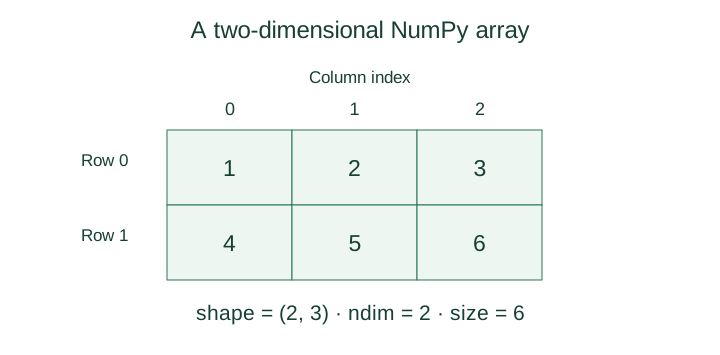
(6,) is a one-element shape tuple. (2, 3) means two rows and three columns. Shape must match the actual data: an array containing five values has shape (5,), not (6,). Object-dtype arrays are an exception to the usual homogeneous numeric-value description.
Page 23 of 29
Array indexing, traversal, and views
NumPy supports one index per axis. Basic slicing usually shares data with the original array, unlike a list slice's new outer list.
import numpy as np

values = np.array([1, 2, 3, 4, 5, 6])
matrix = np.array([[1, 2, 3], [4, 5, 6]])
print(values[3])       # 4
print(values[2:5])     # [3 4 5]
print(values[1:5:2])   # [2 4]
print(matrix[0, 2])    # 3
print(matrix[-1, -1])  # 6
print(matrix[:, 1])   # [2 5]

for row in matrix:
    for value in row:
        print(value, end=" ")
    print()
# Rows: 1 2 3 and 4 5 6
import numpy as np

values = np.array([10, 20, 30, 40])
view = values[1:3]
view[0] = 99
print(values)  # [10 99 30 40]

independent = values[1:3].copy()
independent[0] = -1
print(values)  # [10 99 30 40]
Use .copy() when the selected data must be independent. In matrix[row, column], both indices refer to axes; a list of lists instead normally uses nested[row][column].
Page 24 of 29
Reshaping arrays and matrix operations
Reshaping reorganizes the axes while preserving the number of elements. It returns an array with the requested shape; assigning that return value does not modify the original object's shape.
import numpy as np

values = np.array([1, 2, 3, 4, 5, 6])
matrix = values.reshape(2, 3)
print(matrix.shape)  # (2, 3)
print(values.shape)  # (6,)
# np.array([1, 2, 3, 4, 5]).reshape(2, 3) would raise ValueError.
The product of the new dimensions must equal the element count. reshape() returns a view where possible and otherwise may copy; it does not guarantee independent data.
| Operation | Expression | Meaning |
|---|---|---|
| Addition | a + b / np.add(a, b) | Elementwise sum |
| Subtraction | a - b / np.subtract(a, b) | Elementwise difference |
| Elementwise multiplication | a * b | Multiply corresponding elements |
| Matrix multiplication | a @ b / np.matmul(a, b) | Row-by-column multiplication |
| Transpose | a.T | Swap the axes of a 2-D array |
import numpy as np

a = np.array([[1, 2], [3, 4]])
b = np.array([[5, 6], [7, 8]])
print((a + b).tolist())  # [[6, 8], [10, 12]]
print((a - b).tolist())  # [[-4, -4], [-4, -4]]
print((a * b).tolist())  # [[5, 12], [21, 32]]
print((a @ b).tolist())  # [[19, 22], [43, 50]]
print(a.T.tolist())     # [[1, 3], [2, 4]]
For 2-D matrix multiplication, the left array's column count must equal the right array's row count. The examples use equally shaped arrays for elementwise operations; NumPy also supports broadcasting for compatible shapes.
Page 25 of 29
Creating, traversing, and changing sets
A set is an unordered collection of distinct, hashable objects. It supports membership checks but not positional indexing. Unordered does not mean the order randomly changes on every print; it means you must not rely on an order being defined.
values = {0, 1, 1, 2, 3, 5}
print(sorted(values))  # [0, 1, 2, 3, 5]
print(3 in values)    # True
print(set())          # set(); an empty set
print(type({}).__name__)  # dict; braces alone create a dictionary

vowels = set("aeiou")
for vowel in sorted(vowels):
    print(vowel, end=" ")
print()  # Preceding line: a e i o u
You can traverse a set, or obtain an arbitrary item with next(iter(values)) when it is non-empty. values[0] raises TypeError because sets have no index.
primes = {3, 5, 7, 9, 11}
primes.add(2)
primes.update([13, 17])
primes.remove(9)
primes.discard(99)  # No error when 99 is absent
print(sorted(primes))  # [2, 3, 5, 7, 11, 13, 17]
add() adds one hashable object; update() reads items from an iterable. remove() raises KeyError when an item is missing, whereas discard() does not. Lists and ordinary sets are unhashable and cannot themselves be set elements; frozenset is an immutable, hashable alternative.
Page 26 of 29
Set relationships and removal methods
Set comparisons describe inclusion relationships rather than lexicographic order. Neither a < b nor a > b needs to be true when the sets overlap without containing one another.
| Expression | Interpretation |
|---|---|
a == b | Same elements |
a != b | Different elements |
a <= b | Every element of a is in b: subset |
a < b | a is a subset of b and is not equal to b: proper subset |
a >= b | a contains every element of b: superset |
a > b | a is a proper superset of b |
a.isdisjoint(b) | No common elements |
digits = set(range(10))
odd_digits = {1, 3, 5, 7, 9}
print(odd_digits < digits)    # True
print(digits >= odd_digits)   # True
print({1, 2} <= {1, 2})       # True
print({1, 2} < {1, 2})        # False
print({1, 2}.isdisjoint({3})) # True
| Method or statement | Effect |
|---|---|
s.remove(value) | Remove value; raise KeyError if missing |
s.discard(value) | Remove value if present |
s.pop() | Remove and return an arbitrary item; KeyError if empty |
s.clear() | Remove all items, leaving an empty set |
del s | Delete this name; the object may still have other references |
del s removes a binding rather than guaranteeing that an object is destroyed. Accessing an undefined name raises NameError.
Page 27 of 29
Set algebra and in-place updates
| New-set operation | Equivalent operator | Meaning |
|---|---|---|
a.union(b) | a | b | In either set |
a.intersection(b) | a & b | In both sets |
a.difference(b) | a - b | In a but not b |
a.symmetric_difference(b) | a ^ b | In exactly one set |
a = {1, 2, 3}
b = {3, 4}
print(sorted(a | b))  # [1, 2, 3, 4]
print(sorted(a & b))  # [3]
print(sorted(a - b))  # [1, 2]
print(sorted(a ^ b))  # [1, 2, 4]
print(sorted(a))      # [1, 2, 3]; original unchanged
The four algebra methods in the first table return a new set. Their corresponding update methods change the existing set and return None.
| In-place method | Equivalent assignment |
|---|---|
a.update(b) | `a |
a.intersection_update(b) | a &= b |
a.difference_update(b) | a -= b |
a.symmetric_difference_update(b) | a ^= b |
numbers = {-3, -2, -1, 0, 1, 2, 3}
natural = {1, 2, 3, 4, 5}
result = numbers.symmetric_difference(natural)
print(sorted(result))   # [-3, -2, -1, 0, 4, 5]
print(sorted(numbers))  # [-3, -2, -1, 0, 1, 2, 3]

numbers.symmetric_difference_update(natural)
print(sorted(numbers))  # [-3, -2, -1, 0, 4, 5]
Use sorted output only when the elements are mutually orderable. Sets may contain different types, so sorted() is not a universal display solution.
Page 28 of 29
Dictionaries: keys, values, and insertion order
A dictionary maps unique, hashable keys to values. Values need not be unique or hashable. A pair such as "name": "Ram" is an item.
In Python 3.7 and later, dictionaries preserve insertion order. Updating an existing key keeps its position; inserting a new key adds it at the end. A dictionary is still accessed by keys rather than by positional indices.
student = {"name": "Ram", "age": 18, "semester": "S1"}
print(student["name"])  # Ram
student["age"] = 19
student["college"] = "Engineering college"
print(list(student))  # ['name', 'age', 'semester', 'college']
print(len(student))   # 4
print("age" in student) # True; membership tests keys

for key, value in student.items():
    print(key, value)

del student["semester"]
print(list(student))  # ['name', 'age', 'college']
Reading or deleting a missing key with brackets raises KeyError. Use get() for a default-valued lookup or pop(key, default) for removal when absence is expected.
If a dictionary literal repeats a key, the later value replaces the earlier value. Strings, numbers, and tuples of hashable items can be keys; lists cannot. Avoid adding or removing keys while directly iterating the dictionary's live views.
Page 29 of 29
Dictionary methods and revision checklist
| Method | Result or effect |
|---|---|
d.get(key, default) | Value or default; default is None when omitted |
d.pop(key, default) | Remove and return a value, or return the supplied default |
d.keys() | Live view of keys |
d.values() | Live view of values |
d.items() | Live view of (key, value) pairs |
d.update(other) | Insert or replace entries from another mapping or iterable of pairs |
d.clear() | Remove all entries |
pop() raises KeyError for a missing key if no default is supplied. Dictionary views are not lists; use list(d.keys()) when a list is needed. A view reflects later changes to the dictionary.
student = {"name": "Ram", "age": 18}
keys = student.keys()
print(student.get("college"))           # None
print(student.get("college", "Unknown")) # Unknown
print(student.pop("college", "Absent"))  # Absent
print(student.pop("age"))               # 18
student["semester"] = "S1"
print(list(keys))      # ['name', 'semester']
print(list(student.items()))  # [('name', 'Ram'), ('semester', 'S1')]
student.clear()
print(student)         # {}
Check your understanding
- Why does
returndiffer fromprint()? - Why does a string slice tolerate an oversized stop while an individual index may fail?
- When does a copied list still share nested objects?
- Why are NumPy
*and@different? - Which set methods mutate their receiver?
- Why is a dictionary view different from a snapshot made with
list(...)?
References
- Algorithmic Thinking with Python, Ajeesh Ramanujan and Narasimhan T — source study material.
- Python tutorial: control flow and functions.
- Python tutorial: data structures.
- Python library: built-in types.
- Python library: string constants.
- NumPy quickstart.
- NumPy: copies and views.